Sunflower Seamless Digital Paper Pack: A Practical Guide for Creators
For many creators, finding high-quality, versatile digital assets can be a frustrating search. You might encounter designs that look great on screen but fail in print, or patterns that require tedious manual editing to work seamlessly. This is where a well-crafted Sunflower Seamless Digital Paper Pack steps in, not just as a collection of pretty backgrounds, but as a foundational tool designed to solve common creative problems.
What Exactly is a Seamless Digital Paper Pack?
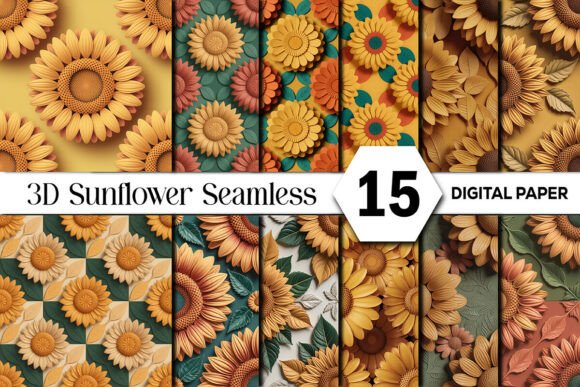
A seamless digital paper pack is a set of repeating patterns engineered so that when tiles are placed side-by-side, the edges match perfectly, creating a continuous, unbroken image. The Sunflower Seamless Digital Paper Pack described here goes further, offering 15 distinct patterns featuring sculpted sunflower designs with realistic paper-cut texture and dimensional depth. Its value lies not in a single-use graphic, but in providing a reliable, scalable resource for projects ranging from digital wallpapers to physical fabric printing.
Common Oversights When Choosing Digital Paper
Even experienced designers can make simple mistakes when sourcing digital patterns, leading to wasted time and subpar results. Here are a few critical areas to pay attention to.
Ignoring the “Seamless” Verification
The term “seamless” is often used loosely. A pattern that isn’t truly seamless will show obvious grid lines, breaks, or mismatched elements when repeated, ruining the professional look of a large-format print or website background. Before committing to a pack, you should always test a tile. Open the file in your design software, duplicate it, and align the copies. Check the edges meticulously. This particular pack is designed for flawless repeating prints, but verifying this claim on a sample is a prudent habit that saves future frustration.
Underestimating Resolution and DPI for Physical Projects
Many beginners download a beautiful pattern and immediately use it for a large poster or fabric print, only to get a blurry, pixelated result. The crucial detail is the combination of size and DPI (dots per inch). A file labeled “12x12 inches at 300 DPI” (like this sunflower pack) provides enough pixel density (3600x3600 pixels) for high-quality physical printing at that size or even larger, depending on your printer’s capabilities. Using a 72 DPI web graphic for a scrapbook page will produce poor quality. Always match the DPI to your output medium: 300 DPI for print, lower values for screen use.
Misunderstanding “Commercial Use Friendly”
This term is a beacon for entrepreneurs, but it can be misunderstood. “Commercial use friendly” typically means you can use the assets in projects you sell, like a printed journal or a client’s website banner. However, it usually does not mean you can resell or redistribute the digital files themselves as your own product. You are licensed to use the art within a new creation, not to sell the source files. Always read the specific license terms included with the download to avoid legal issues and protect your business.
Practical Application and Avoiding Pitfalls
Once you have a reliable pack, applying it effectively is the next step. Here’s how to avoid common application errors.
Forgetting About Color Mode Consistency
A vibrant digital pattern like this, with its rich golden yellows and teals, can look dramatically different when printed if color modes are inconsistent. Digital files are often in RGB (Red, Green, Blue) color mode, ideal for screens. Professional printing processes, especially for fabric or sublimation, often require CMYK (Cyan, Magenta, Yellow, Black) mode. A direct RGB-to-CMX conversion can cause color shifts, making sunflowers look muted. Before sending to a professional printer, consult with them about their preferred file format and color mode. For home printing, ensure your printer software settings are calibrated for photo-quality color.
Using the Wrong File Format for the Task
This pack includes JPG files, which are excellent for their high resolution and smaller file size compared to PNGs. JPGs are perfect for printing, scrapbooking, and digital backgrounds. However, if you need a background with a transparent area (for overlaying text cleanly), a JPG won’t work, as it has a solid background. In such a case, you would need to use the JPG as a base and create a transparency in your design software. Knowing the strengths of your file format helps you plan your workflow efficiently.
Overlooking Texture and Scale in Design Composition
The realistic paper-cut texture and dimensional depth in these patterns are key features. A common mistake is to treat such a textured pattern as a flat background and then overlay busy text or intricate elements, causing visual conflict. The pattern itself is a strong design element. A better approach is to use it for large areas like full-page backgrounds or wrapping paper, or to pair it with simple, bold typography and minimalist icons that complement rather than compete with the botanical detail. Scale is also important: using a large, detailed sunflower pattern on a very small planner sticker might make the detail indistinct. Adjust the scale of the pattern tile to suit the size of your final product.
Key Checks Before You Download or Use
To ensure a smooth experience from purchase to project completion, make these quick checks a standard part of your process.
- Project Alignment: Confirm the pack’s style (e.g., “warm autumn tones,” “botanical detail”) matches the aesthetic of your current project. Don’t buy for potential future use; buy for an immediate need.
- Technical Specs: Verify the listed size, DPI, and file format meet your technical requirements. 12x12 inches at 300 DPI JPG is a professional standard for print.
- Instant Download Access: After purchase, know where your download link is and save the files immediately to a dedicated “Design Assets” folder on your computer or cloud storage. Losing track of downloads is a frequent hassle.
- Software Compatibility: Ensure your design software (Canva, Adobe Photoshop, Illustrator, Procreate, etc.) can easily import and manipulate JPG files at the provided high resolution.
A thoughtfully designed Sunflower Seamless Digital Paper Pack is more than a decorative item; it’s a versatile, problem-solving tool for your creative workflow. By paying attention to the often-overlooked details of seamlessness, resolution, licensing, and application, you can elevate the quality of your projects, avoid costly mistakes, and reliably produce work that reflects your vision, from the first sketch to the final print.